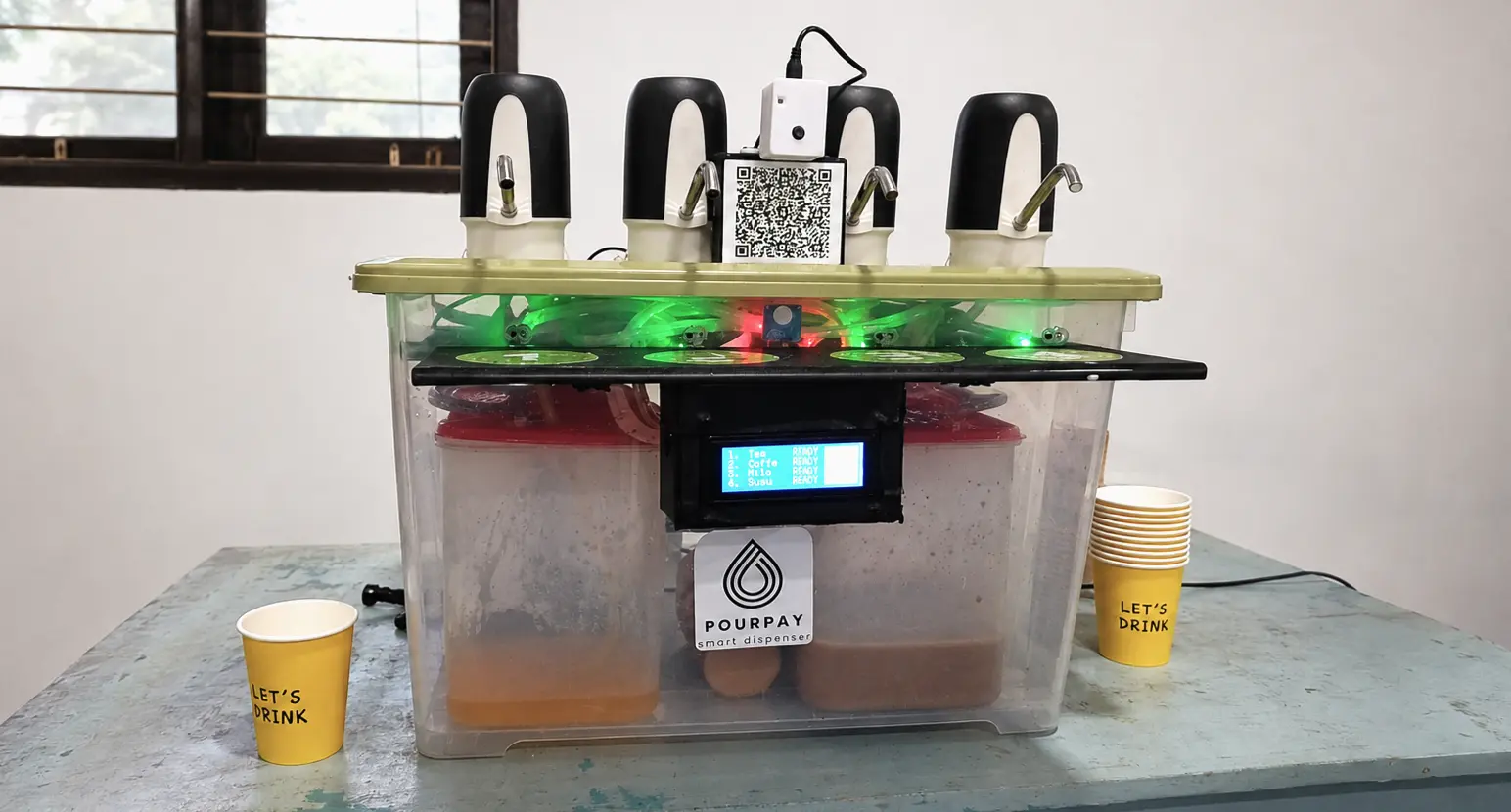
PourPay Smart Dispenser
CompletedMy original project idea got rejected by my teacher, so I built a machine that takes digital payments, talks back to users, and nearly started a small fire instead. Here's the story.
PourPay is an automatic drink dispenser that accepts QRIS cashless payments. Scan the QR code, pick a drink, place your cup, and it pours itself. No cashier, no cash, no waiting around.

What makes this different from a typical vending machine is that PourPay doesn’t dispense bottles or cans, it pumps liquid drinks straight from a jug into a cup. Think of the water dispensers you’d find at home, except this one thinks, calculates, and takes digital payments.
The idea for this project honestly started by accident. I originally pitched an andon-style production monitoring system, but my teacher shot it down right away. We spent almost an hour discussing alternatives until I landed on the dispenser idea, mostly because I remembered an alumni project from the year before that only had one pump and still used coins for payment. I figured there was a lot of room to improve on that, and that’s how PourPay was born.
As for the division of labor, I’ll be honest, I handled almost all of the technical work myself. Designing the device, building the hardware, writing every line of firmware (over 2000 lines total). Most of my teammates mostly helped fund the parts. Thankfully one of them still helped write the report, otherwise things would’ve gotten even messier.
What it can actually do
- 4 independent drink slots. Each with its own pump, an ultrasonic liquid-level sensor (HC-SR04), and configurable price and drink name via the dashboard.
- QRIS cashless payment. Scan and pay from any e-wallet (GoPay, OVO, DANA, etc.), and the system detects the incoming payment automatically.
- Automatic cup detection. An infrared sensor confirms a cup is properly placed before pouring, so there’s no spillage.
- Voice guidance. A speaker and DFPlayer Mini module make the machine talk to users. Payment confirmation, placement instructions, even error warnings.
- Real-time admin dashboard. Monitor stock levels, transaction history, room temperature and humidity, even a live camera feed, all from a browser.
- Automatic WhatsApp alerts. When stock runs low or something goes wrong, I get a WhatsApp message instantly, no need to check the machine manually.
- Remote firmware updates (OTA). Bug fixes get pushed remotely, no need to plug in a USB cable.
- Automatic refund system. If a transaction fails (say, a cup isn’t placed in time), the user’s money gets refunded automatically. No manual complaints needed.

How it works under the hood
The brain of the whole system is an ESP32, a small but capable microcontroller with built-in WiFi. It controls the pumps, reads the sensors, drives the LCD display, and talks to the internet.
The part I’d call the most fun to hack together wasn’t the hardware, it was figuring out how to connect QRIS payments. Since this is a student project, not a business with access to an official merchant API, I improvised with a combination of:
- GoPay Merchant for the official QRIS code.
- MacroDroid (an Android automation app) that intercepts incoming payment notifications on the admin’s phone.
- Those notifications get parsed automatically and sent to Firebase Realtime Database.
- The ESP32 continuously polls Firebase, and the moment a matching transaction shows up, it processes the drink.
All data (transactions, liquid levels, device status) syncs in real time through Firebase, so the web dashboard and the physical machine are always in sync with no delay. The camera runs separately on an ESP32-CAM, communicating over MQTT (HiveMQ), so streaming images never slows down the main system.

The hardest (and dumbest) moments
Since I handled almost all the technical work solo, there was plenty of drama behind the scenes. Two moments that stuck with me the most:
First, I accidentally blew up one of the ESP32 boards by installing a header backwards. Pretty ridiculous looking back on it. I still knew nothing about PCB design at the time and was running low on time, so the project stayed a prototype. At least I cleaned up the wiring with spiral cable wrap so it didn’t look like a total mess.

Second, there was a weird bug where the device kept rebooting on its own during startup. After hours of troubleshooting, it turned out some components weren’t sharing the same ground. I only found the fix at dawn, right after waking up from being completely exhausted. Relief and a bit of a laugh at myself, all at once.
What I’m most proud of
I learned so much from this project that I’d never tried before. Getting deeper into embedded programming (writing over 2000 lines of firmware), and learning how to work around limitations, like the MacroDroid trick for QRIS, when you don’t have official access to a more sophisticated system.
The proudest moment came after finishing it. My extended family couldn’t stop praising it, it got used to demo the school’s tech to visiting government officials, and eventually the story behind this project ended up in a book published by Indonesia’s Ministry of Education:
Majid, Mohammad Ajid Abdul, Iryanto, Asep, Wandono, Miwahyudi, and Kamila, Hana Aprilia (2025). Jejak Inovasi: Bunga Rampai Pembelajaran Koding dan Kecerdasan Artifisial di Sekolah Indonesia. Directorate General of Early Childhood, Basic, and Secondary Education, Jakarta. repositori.kemendikdasmen.go.id/34006